How to Get Your First 10 Attendees
Build a qualified contact list, send personal invitation waves, use trusted referrals, and diagnose the weak step on the way to ten confirmed registrations.

Your first ten attendees are a conversion path, not a traffic target. Start with people who can realistically benefit, give them one page that resolves the commitment questions, invite them in small personal waves, and record where the path stalls. The useful sequence is qualified names → relevant invitations or introductions → replies or page visits → confirmed registrations. When one transition is weak, repair it before asking a larger audience to compensate.
What Has to Work Before Ten People Register
The first-ten system needs a defined guest, one page, small waves, and transition tracking. These four operating rules keep the work finite:
- Define fit: list people whose need, timing, location, price, and practical constraints match the event.
- Use one destination: send every contact to the same complete event page and RSVP path.
- Work in waves: learn from a small group before using the rest of your relationships.
- Count transitions: separate replies, visits, and registrations so you know what to fix.
Define Who the First 10 Need to Be
Audience specificity makes the remaining funnel testable. The U.S. Small Business Administration’s market-research guidance recommends defining a specific target market and using direct research to understand potential customers. For a first event, write one sentence that combines the guest, the problem or desire, and the immediate outcome: “First-time balcony gardeners who want to leave with three planted containers,” for example.
Name the Direct-Fit Guest
Need, timing, and constraints create a direct-fit filter. A direct-fit person has a current need and circumstances that make attendance realistic: the stated time and place work, the price or free commitment is acceptable, and the format feels suitable. Score each name with three simple checks: “needs the outcome,” “can realistically attend,” and “would choose this format.” Keep the name when all three are plausible. Move a curious but unavailable person to the referrer column instead of treating interest as likely attendance. Add the reason for fit beside every retained name; if you cannot write that reason in one sentence, the contact is not ready for the direct-invite lane.
Add Referrers After the Audience Is Clear
A referrer can make a relevant introduction only when the guest definition is specific. A trusted referrer understands the event and can introduce one person who fits it. An exploratory interview study of 31 people considering social events found that event characteristics, relationships, and communication medium shaped participation decisions. The study does not provide a conversion rate, but it supports a practical point: a contextual introduction carries information that a generic public post cannot. Give the referrer the guest definition and the page link, then ask for one introduction rather than a public endorsement or access to their contacts.
Publish One Page That Answers the Commitment Questions
Every invitation needs one decision-ready destination. HereNow lets you keep the promise, logistics, host information, and RSVP on one public event page, so the message can stay personal without becoming a long explanation. Before outreach, use the complete checklist to write an event page that gets signups.
Put Decision Details Above the Story
Outcome, host, time, place, price, and inclusions deserve early visibility. Readers scan web pages, and Nielsen Norman Group’s usability guidance recommends meaningful subheadings, bullets, and focused paragraphs. Put the practical commitment details before a long origin story. If the guest must bring equipment, climb stairs, arrive early, or accept a refund condition, make that visible too. Clear constraints remove unsuitable registrations and make a suitable guest more confident. Preview the page on a phone and ask whether a new visitor can understand the event, trust the host, and locate the registration action without opening another tab.
Remove Registration Friction After the Page Earns Trust
A short, clearly labeled RSVP form should follow a credible event page. Ask only for information needed to run this event, such as name, email, access needs, or a necessary choice. Do not make a platform account a condition of attendance. The W3C Web Accessibility Initiative says labels should describe a form control’s purpose and be associated with it. Visible labels such as “Email for event updates” are clearer than placeholder-only fields or vague labels such as “Details.” Complete a test registration yourself, including confirmation and calendar information, before sending the first invitation.
Build a 36-Name Outreach Map
A three-lane map separates likely guests, trusted introducers, and reserve distribution. The following 36-name model is an illustrative planning scenario, not a benchmark or promised conversion rate. Replace every number with what your real relationships and event allow.
| Lane | Names | Specific ask | Illustrative result |
|---|---|---|---|
| Direct-fit people | 24 | A personal invitation naming why the event fits | 8 confirm |
| Trusted referrers | 8 | One fitting introduction, not a list blast | 2 introduced people confirm |
| Community connectors | 4 | Relevant group distribution only if more reach is needed | Held in reserve |
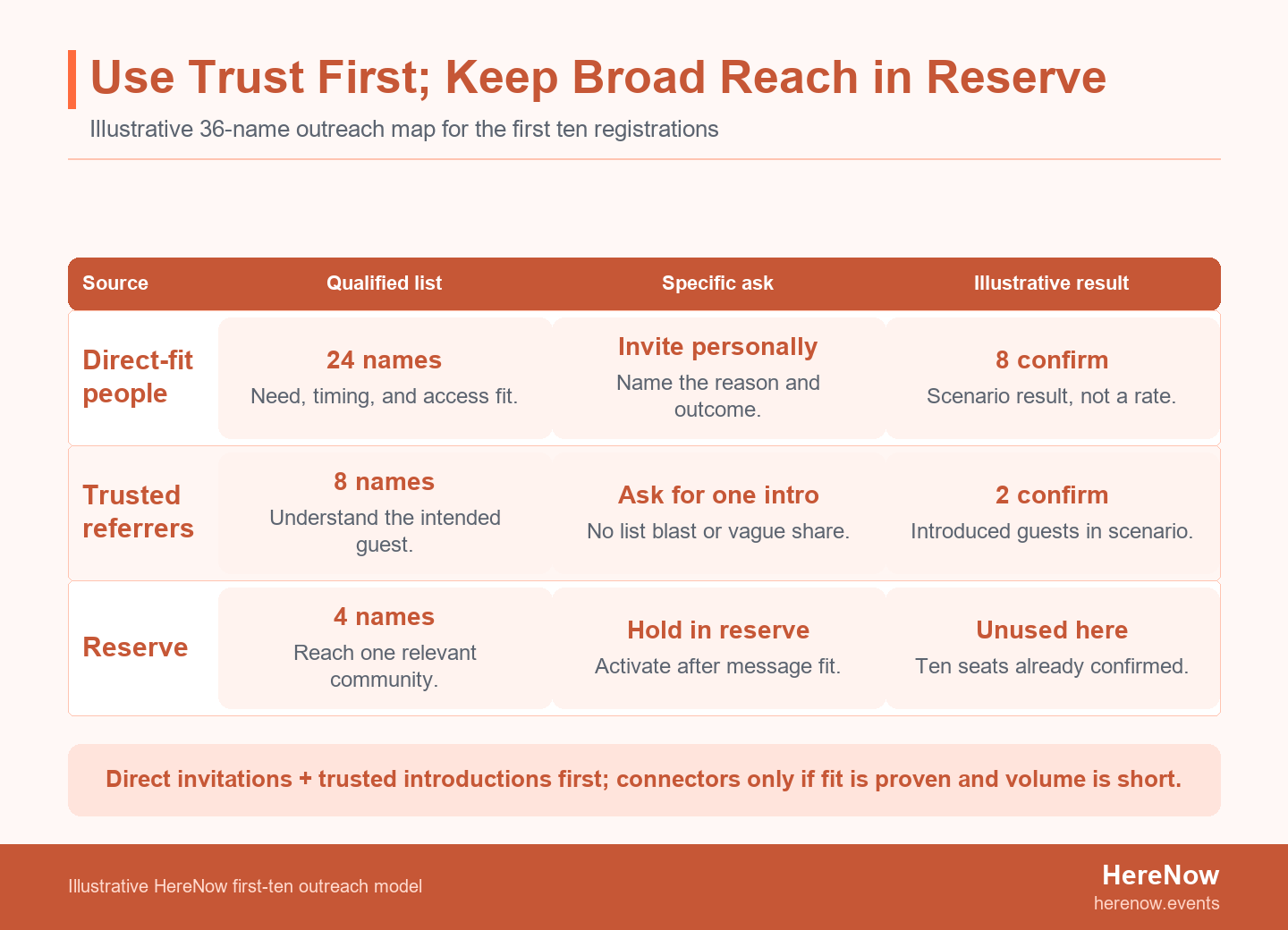
A community connector is someone who can share the event with one relevant group, such as a club organizer, studio owner, teacher, or neighborhood newsletter editor. Keep connectors separate from referrers because the ask is different. A referrer makes a personal bridge; a connector provides distribution. In this scenario, eight direct invitees and two introduced people register, so the connector reserve is not used.
The model’s value is sequence, not arithmetic. If direct invitees reply positively but do not register, more distribution may amplify the same unresolved objection. Review the event page, timing, price, or promised outcome first. If direct-fit people register and you simply need two more names, activate one connector whose community closely matches the attendees already saying yes. To see the product context behind this one-page handoff, see how HereNow turns an event idea into one shareable page.
Send Personal Invitations in Small Waves
Small waves protect the remaining list while the host tests relevance and clarity. Send four to six invitations, wait long enough for normal replies, and record the questions people ask. Then improve the message or page before the next wave. This mirrors the logic in Australian government marketing-plan guidance: connect a target market, message, channel, goal, timeframe, and evaluation rather than treating promotion as one undifferentiated task.
A useful invitation contains five parts:
- Personal reason: why this event made you think of this person.
- Concrete outcome: what they will do, learn, make, or experience.
- Decision details: the date, place or online format, duration, and price.
- Low-pressure ask: a clear invitation without pretending the event is almost full.
- One link: the complete event page, not several competing destinations.
Write the first message yourself, then use these event invitation message examples to adapt the tone for a friend, former colleague, community member, or professional contact. Personal means specific, not artificially casual: one honest reason is more credible than inserting the person’s name into a mass template.
Use Referrals and Connectors Without Turning Them Into Spam
Reach should expand through relevant introductions and permission-aware distribution. Ask a referrer, “Is there one person who would genuinely benefit from this?” Include a two-sentence description they can forward, but let them decide whether and how to make the introduction. Do not ask for someone else’s private email list or imply that the referrer has endorsed a paid event when they have only agreed to pass it along.
Use a community connector after the first waves show that direct-fit people understand the offer and some are registering. Give the connector a complete page, the exact group fit, and a suggested expiry date for the announcement. Ask them to share once in the channel where that group expects relevant notices; do not ask for repeated posting across unrelated groups.
Email, text, and direct-message marketing rules vary by jurisdiction and consent context. In the United States, the FTC’s CAN-SPAM compliance guide sets requirements for commercial email, including accurate message information and opt-outs. In the United Kingdom, ICO guidance generally requires specific consent for electronic marketing to individuals, covers social direct messages, and allows only limited exceptions. These are jurisdiction-specific examples, not legal advice: check the current rules that apply to your audience, identify yourself, and honor every request to stop.
If the connector reserve becomes necessary, use the organic channel plan to promote a small event without paid ads.
Diagnose the Broken Step Before Expanding Reach
The stalled transition determines the next repair. A conversion ladder is the movement from qualified names to invitations, replies or page visits, and confirmed registrations. Do not collapse those stages into “promotion worked” or “promotion failed.” Even a small sample can reveal a directional problem when the behavior is consistent.
| Observed pattern | Likely weak transition | Repair before adding reach |
|---|---|---|
| Few people seem relevant enough to invite | Audience → qualified names | Narrow the guest definition or redesign the outcome for a group you can reach. |
| Invitations receive little response | Qualified names → replies | Make the personal reason, outcome, date, place, and ask clearer. |
| People reply warmly or visit but do not register | Interest → confirmation | Check timing, price, host trust, page clarity, restrictions, and RSVP friction. |
| People intend to come but remain unconfirmed | Decision → completed RSVP | Send one direct reminder with the deadline and one registration link. |
| Direct-fit people register but the list is exhausted | Working path, insufficient volume | Activate trusted referrers, then the most relevant connector. |
Do not overread three messages as a statistically reliable result. Use the table as an operating diagnosis: look for repeated questions, abandoned steps, or a visible point of hesitation. Change one major variable at a time. If you rewrite the audience, invitation, price, page, and registration form together, the next wave cannot tell you which repair mattered.
Track Confirmations, Not Vanity Metrics
A source-and-status tracker preserves the conversion path that social metrics obscure. Use one row per person with these fields: name, lane, reason for fit, source, date contacted, current status, objection or question, and next action. Useful statuses are “not contacted,” “invited,” “replied,” “registered,” “declined,” and “follow up on date.” If you use analytics, Google’s Campaign URL Builder explains source, medium, and campaign parameters. The confirmed-registration count is still the scoreboard; likes and impressions are context.
Give direct, referral, and connector links distinct campaign tags only when source attribution will change a decision. Tags can show where visits came from, but they do not explain a person’s objection or replace your registration list. Record repeated questions beside the channel data, and review the tracker at the same time each day during the first waves. That cadence prevents an unanswered message from becoming an accidental second or third follow-up.
Keep the RSVP itself proportionate. A shorter path should never mean hiding material conditions; show those before the form. Once the page has earned trust, remove fields you do not need to run the event and review the no-account RSVP setup.
Put the First Wave Live in 48 Hours
The method becomes useful when one page and one invitation wave are live. In the first 24 hours, define the direct-fit guest, publish the event details, and build the three-lane list. In the next 24, send four to six personal invitations and record the first responses. Do not wait for a perfect promotional calendar before creating evidence.
After the first replies, choose one action: continue the same message, revise the unclear detail, or reconsider the audience and offer. Keep the first wave open long enough for normal replies, but set a review time rather than checking the attendee count after every message. Record what changed before wave two.
Use the same page link in every invitation so replies and visits remain comparable. Test the page on a second device, complete one RSVP, confirm that the date and timezone are unambiguous, and verify that the host name and contact path are visible. If the event has a capacity, price, approval step, accessibility note, or cancellation condition, make sure the registration experience does not introduce a surprise after the invitation.
The goal of the 48-hour cadence is not speed for its own sake. It creates a small body of observable evidence while enough qualified names remain to act on what you learn. When the page and RSVP are ready, use HereNow to start creating your event page.
Related guides: Use the event-page guide before outreach, the invitation examples while writing wave one, and the organic-promotion guide only after direct and referral signals show that the offer is landing with the right people.
Frequently Asked Questions
How many people should I invite to get 10 attendees?
There is no universal invite-to-registration ratio, so start with a qualified list you can contact personally and measure each transition. Your number will change with trust, relevance, timing, price, location, and event type. The 36-name model above is illustrative, not a forecast. If the first direct-fit wave gets almost no replies, improve the list or invitation before doubling the number. If people reply and register, add the next wave using the same audience definition.
Should my first 10 attendees be friends or colleagues?
Friends are useful first attendees only when they genuinely match the event and can give honest feedback afterward. A supportive friend who would never choose the topic, time, price, or format can create false confidence about demand. Treat friends and colleagues by the same direct-fit checks as everyone else. If they are not plausible guests, ask whether they know one person who is. Make it easy for them to decline without affecting the relationship.
How often should I follow up after an invitation?
One brief follow-up is usually enough for a personal first-wave invitation unless the person asked you to remind them later. Wait a reasonable period for the channel and event date, then restate the decision detail that matters most and include the same registration link. Do not turn silence into a conversation by sending repeated nudges. Mark the contact as no response and move to the next qualified name or referrer.
Should I discount tickets to fill the first 10 seats?
Discount only when it supports a deliberate test, because a lower price can hide a targeting, value, or page problem. Decide what the discount is testing: early commitment, a pilot format, or a defined community rate. State the normal and reduced terms honestly, limit the discounted allocation, and keep the guest experience consistent. If people understand the event but still reject the price, revisit the offer economics instead of applying an open-ended last-minute reduction.